INF 270: WordPress — Week 8: PHP and WordPress Development
Advising Signups
What is PHP?
PHP is a server-side scripting language used to build dynamic websites. It:
- Processes data on the server
- Generates HTML to send to the browser
- Handles tasks like form submissions, database interactions, and user authentication
Because PHP is widely supported and easy to deploy, it became one of the most common languages for content-driven websites.
How PHP Is Related to WordPress
WordPress is primarily built with PHP. Core WordPress files, themes, and many plugins use PHP to generate pages, fetch content from the MySQL database, and handle backend functionality.
When a visitor opens a WordPress page, PHP assembles the content and template into the final page output.
Even if you don't plan to become a PHP developer, understanding the basics of PHP will give you a deeper insight into how WordPress works and helps you customize WordPress themes, understand plugin code, and debug site behavior.
Server-Side (PHP) vs Client-Side (JavaScript)
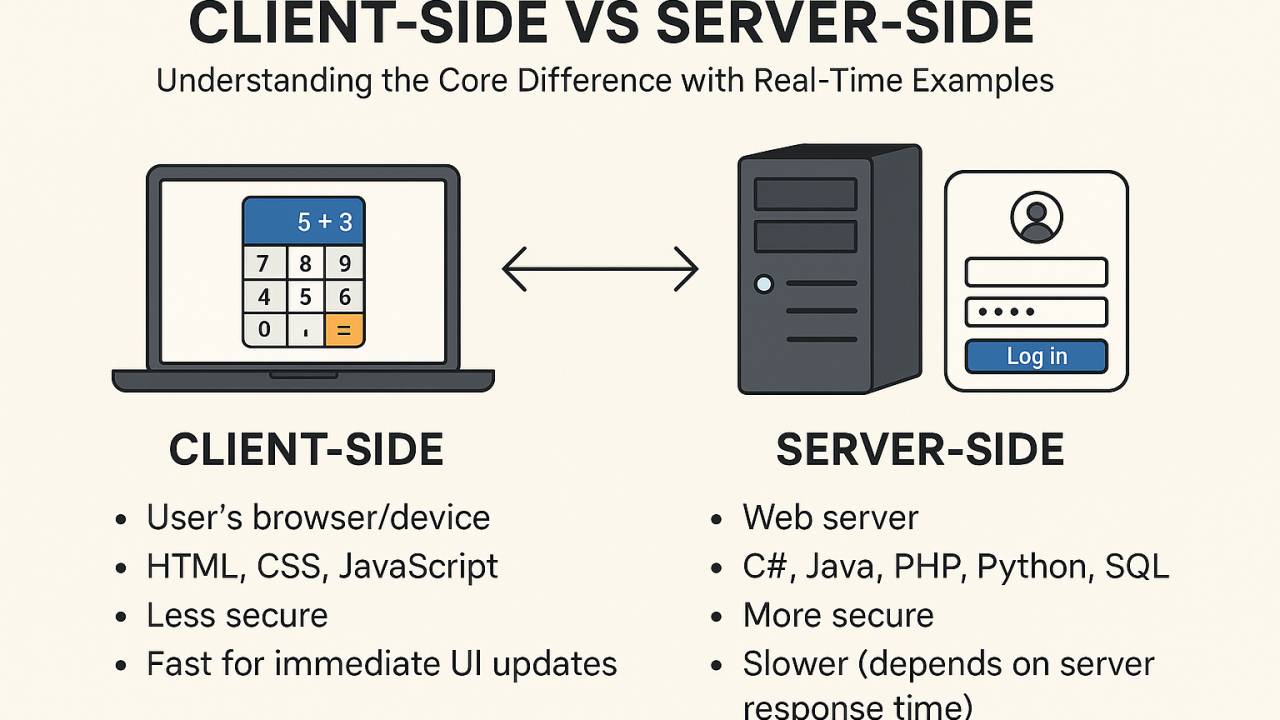
Server-side code (like PHP) runs on the web server before the page is sent to the user. It is used for tasks like querying databases, processing logins, and deciding what content to render.
Client-side code (like JavaScript) runs in the user’s browser after the page loads. It is used for interactivity such as simple form validation, dynamic UI updates, and handling clicks without reloading the page.
In general, anything related to security, authentication, and data processing should be handled by server code. Client-side code can be easily manipulated by the user and should never be trusted for sensitive operations.
For example: to check whether a user is logged in, you would use server-side code.
In a typical WordPress site, PHP builds the page on the server and JavaScript enhances the experience in the browser.
PHP Syntax Step 1: Hello, World!
Go to https://php-play.dev/ to test PHP code online.
All PHP code needs to begin with <?php - this tells the server to start processing PHP. You can write any PHP code after that, and it will run until the end of the file or until you close the PHP tag with ?>.
When working with actual files, PHP code is saved with a .php extension.
echo prints text to the page:
<?php
echo "Hello, World!";
Unlike JavaScript, PHP requires a semicolon at the end of each statement. Forgetting it will cause an error.
PHP Syntax Step 2: Variables
PHP variables start with $. Here we store one string in a variable and echo it.
<?php
$message = "Hello, World!";
echo $message;
You can also store numbers in variables - just don't put them in quotes. PHP will treat them as numbers when you do math with them.
<?php
$number = 42;
echo $number;
Combining Strings (Concatenation)
In PHP, you combine strings using a dot (.). This is called concatenation.
Each piece of text can be a quoted string or a variable. PHP joins them from left to right.
<?php
$firstName = "Peter";
$course = "INF-270";

echo "Hello, " . $firstName . "! Welcome to " . $course . ".";
There's an easier way, though, as long as you use double quotes "" to wrap your string as opposed to single quotes ''. This allows you to directly include variables within the string.
<?php
$firstName = "Peter";
$course = "INF-270";

echo "Hello, $firstName.  Welcome to $course.";
Combining Numbers (Math Operators)
PHP supports basic math operators: + (add), - (subtract), * (multiply), and / (divide).
When your variables are numbers, PHP performs math directly on them.
<?php
$a = 10;
$b = 2;

echo $a + $b; // 12
echo "<br />"; // line break
echo $a - $b; // 8
echo "<br />"; // line break
echo $a * $b; // 20
echo "<br />"; // line break
echo $a / $b; // 5
PHP and HTML
Notice how in the previous example, we used <br /> to create line breaks in the output. Since PHP runs on the server and generates HTML, you can include any HTML tags in your output to control how it looks in the browser.
This example combines HTML with periodic PHP:
<?php
$user_name = "Peter";
$points = 100;
?>

<div>
	<h1>Welcome!</h1>
	<p>
		You are logged in as <?php echo $user_name; ?>.
		You currently have <?php echo $points; ?> points.
	</p>
</div>
This type of mixed-use PHP/HTML is common in WordPress.
Group Work
Work together with a partner on these exercises.
Exercise #1
Copy and paste this HTML snippet into PHP Playground. Replace the div class, the user name, and the message count with PHP variables.
<section class="logged-in">
	<h1>Dashboard</h1>
	<p>You are logged in as John Doe.</p>
	<p>You currently have 7 unread messages.</p>
</section>
Exercise #2
Copy and paste this PHP snippet into PHP Playground. Replace the ? placeholders with PHP variables. Hint: you will need to create some new variables.
<?php
$total_points = 96;
$user_points = 63;
?>

<div>
    The total points are ?.<br />
    Your earned points are ?.<br />
    Current percentage: ?%.<br />
    You need ? points to get to 100% completion.<br />
</div>
Functions
Functions in PHP allow you to encapsulate code into reusable blocks. You define a function with the function keyword, followed by the function name and parentheses. You can pass parameters to the function and return a value.
<?php
function greet($name) {
	echo "Hello $name!<br />";
}

greet("Alice"); // Output: Hello Alice!
greet("Bob");   // Output: Hello Bob!
Functions can take more than 1 argument. They can also return a value to be saved in a variable for later use.
$total_points = 96;
$user_points = 63;

function get_percentage($amount, $total) {
    return ($amount / $total) * 100;
}

Current percentage: <?php echo get_percentage($user_points, $total_points); ?>%.
Exercise #3
Replace another calculation in exercise #2 with a function.